
SMS2VPS
Synchronize SMS from Android to your VPS, Google Drive, or Gmail – securely and on your terms.
SMS2VPS is a secure Android app that synchronizes incoming SMS to your chosen destination: a self-hosted VPS, Google Drive, or Gmail. Messages are stored securely and can be accessed remotely as a reliable backup solution. Synchronization only occurs after you manually activate it in the app settings.
SMS2VPS is now available on Google Play and can be downloaded using the link below.

The app's code is hosted on GitHub as open-source and supports ongoing development.

How to Set Up SMS2VPS on Your Android Device and VPS
Before you start forwarding SMS to another device or server, install SMS2VPS from Google Play, open the app, and complete the basic setup on your phone and VPS.
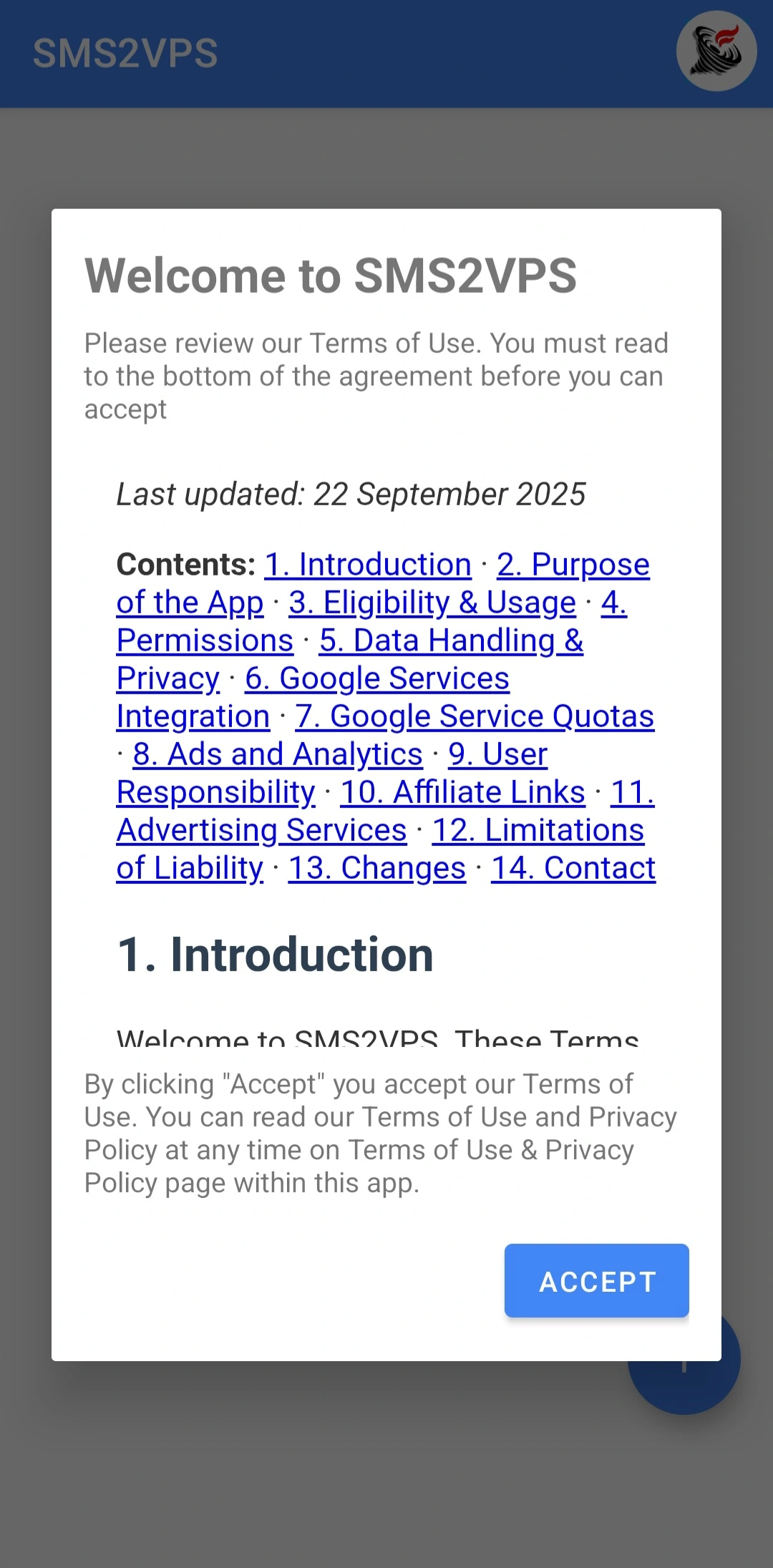
Step 1: Accept Terms and Grant Permissions
- Open SMS2VPS after installation.
- Read and accept the Terms of Use and Privacy Policy.
- Grant the required SMS permissions when requested by Android.
Step 2: Configure VPS Settings
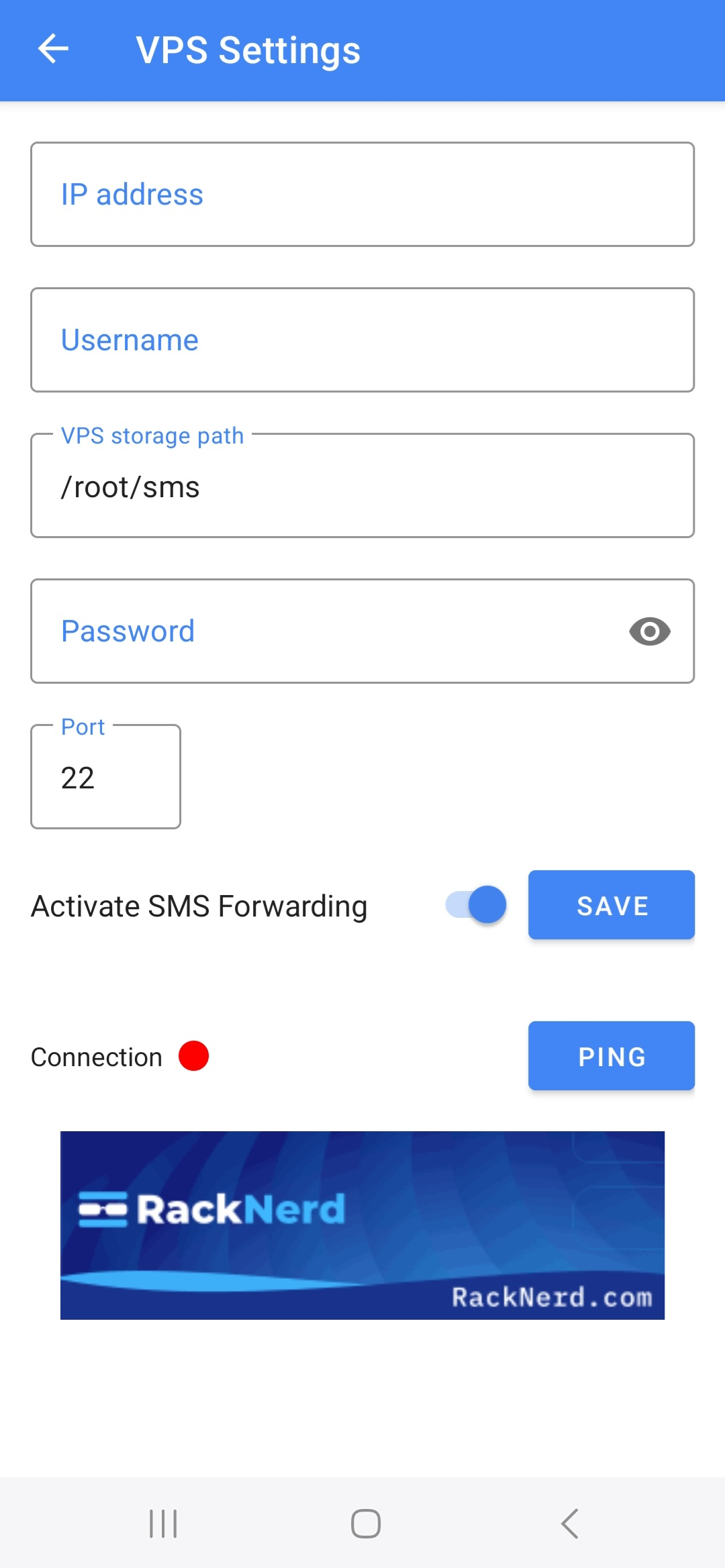
Open the VPS Settings view from the app and fill in the connection details:
- Host/IP address: IP of your VPS or server that receives SMS files.
- Username: SSH user on that server.
- Storage path: Folder where SMS text files should be saved, for example
/root/sms. - Password: Password for the SSH user.
- Port: Usually
22on a VPS, or another port if you changed it.
After entering everything, tap the Save button in SMS2VPS so that the app remembers your settings. Then use the connection test in the app to verify that your VPS is reachable before activating synchronization.

Helpful VPS Commands
Run these commands on your VPS or Linux server to find the correct values for the VPS Settings view:
curl -s https://api.ipify.org
hostname -I | awk '{print $1}'
whoami
echo $HOME
pwd
Use a Windows 11 PC Instead of a VPS
If you do not want to rent a VPS, you can also turn a Windows 11 computer into an SSH server and use it as the SMS synchronization target.
- Open Settings on your Windows 11 PC and go to System > Optional features. Click View features, search for "OpenSSH Server", select it and click Next > Install.
- After installation, open the Start menu, type services.msc and press Enter. In the Services window, find "OpenSSH SSH Server", open its properties, set Startup type to Automatic and click Start. Confirm with OK.
- Allow SSH through the firewall: open Windows Defender Firewall with Advanced Security, create a new Inbound Rule for Port, choose TCP and port 22, and allow the connection for the profiles you use (Domain, Private, Public).
-
Find the PC's IP address by opening Terminal or Command Prompt and running
ipconfig. Note the IPv4 address of the active network adapter. -
Create or choose a folder for SMS backups, for example
C:\sms2vps\inbox, and make sure your Windows user has read/write permissions to that folder. You can create it from PowerShell or an SSH session with:mkdir C:\sms2vps\inbox. -
In SMS2VPS on your Android device, open the VPS Settings view and use the following values:
- Host/IP address: the IPv4 address you found with
ipconfig - Port: 22
- Username: your Windows account name
- Authentication: your Windows account password, or an SSH private key if you prefer key-based login (paste the full key including the BEGIN/END lines).
- Remote directory:
C:\sms2vps\inbox(the folder created above)
When the target is a Windows OpenSSH server, always use Windows-style paths such as
C:\sms2vps\inboxin the SMS2VPS settings, not Linux-style paths like/cygdrive/c/.... - Host/IP address: the IPv4 address you found with
-
From another device (or Termux on your Android phone), test the connection with an SSH client, for example:
ssh your_username@your_windows_ip. If the login works and you can see theC:\sms2vps\inboxfolder, you are ready to use SMS2VPS with this PC.
Set up the OpenSSH server from PowerShell
Alternatively, you can install and configure the OpenSSH server on Windows 11 directly from an elevated PowerShell window using the following commands:
Add-WindowsCapability -Online -Name OpenSSH.Server~~~~0.0.1.0
sc.exe create sshd binPath= C:\Windows\System32\OpenSSH\sshd.exe start= auto
Start-Service sshd
Get-Service sshd
Set-Service -Name sshd -StartupType 'Automatic'
New-NetFirewallRule -Name sshd -DisplayName 'OpenSSH Server (sshd)' -Enabled True -Direction Inbound -Protocol TCP -Action Allow -LocalPort 22
ssh-keygen -t ed25519 -C "sms2vps-key"
type $env:USERPROFILE\.ssh\id_ed25519.pub >> $env:USERPROFILE\.ssh\authorized_keys
ipconfig
Once the SSH connection test succeeds and SMS2VPS has saved your settings, you can activate SMS synchronization and store all messages directly on your Windows 11 machine.
To verify that everything works, send a test SMS to your phone and on the Windows PC run
Get-ChildItem C:\sms2vps\inbox
and
Get-Content C:\sms2vps\inbox\*.txt
in PowerShell to see the saved message files.
How to Receive Text Messages on Another Android device?
Only after the user has installed the SMS2VPS application on the Android phone from which text messages are forwarded, can Termux and OpenSSH be used on the receiving Android device.
Step 1: Install Termux
The Termux application is available for download from the Google Play Store, the F-Droid website. Once installed, open the Termux app to begin the setup process.
Step 2: Configure OpenSSH in Termux
After opening Termux, enter the following commands one by one in the command line:
pkg update
pkg install openssh
sshd
passwd
ifconfig
whoami
ls -la ~/storage/
Step 3: Configure the Receiving Device in SMS2VPS
Next, you need to configure the receiving device on the SMS2VPS app's VPS Settings page as follows:
-
IP address: Enter the IP address that you saw when you ran the
ifconfigcommand. -
Username: Enter the username that you obtained from the
whoamicommand. -
VPS storage path: You can enter your desired folder path where you want the .txt file to be saved.
You can check available folders with the
ls -la ~/storage/command from Step 2. For example:/storage/emulated/0/Download -
Password: Enter the same password that you created with the
passwdcommand. -
Port: You can enter
8022, which is the default port used by the Termux application. However, if you want to change it temporarily to another port (for example, port 2222), follow the steps below.
Step 4: Changing the Port (Optional)
Temporary Port Change
To temporarily change the port to 2222, run the following commands:
pkill sshd
sshd -p 2222
💡 Tip: Make sure both devices are connected to the same network for the SSH connection to work properly. You can verify the connection by testing the SSH connection from the receiving device before configuring SMS2VPS.
Use SMS2VPS over Different Networks
The examples above assume that your Android device and VPS (or receiving device) are on the same local network. If your phone is on mobile data or a different Wi‑Fi network, you can still use SMS2VPS reliably by creating a secure, private network between your phone and server using tools such as Tailscale, ZeroTier, or Twingate.
The steps below assume that you have already installed SMS2VPS, configured everything in the VPS Settings view, and successfully tested a normal SSH connection to your VPS or receiving device.
General Preparation
- Choose one of the options below (Tailscale, ZeroTier or Twingate).
- Install the client on both your Android phone and the VPS or receiving device.
- Verify that you can connect to the VPS over the new private IP address before activating SMS synchronization.
Option 1: Tailscale
- Create a free Tailscale account at tailscale.com.
- Install the Tailscale app on your Android phone from Google Play and sign in using the same account.
- Install Tailscale on your VPS or receiving device and authenticate it to the same Tailscale account.
-
On the VPS, run
tailscale ip -4(or check the Tailscale admin console) to see the private Tailscale IP address. - Open the SMS2VPS app and in VPS Settings set Host/IP address to the Tailscale IP you found in the previous step.
- From another SSH client on your phone, test the connection to the Tailscale IP and SSH port. When the test works, you can safely activate SMS synchronization over Tailscale.
Option 2: ZeroTier
- Create a ZeroTier account at zerotier.com and create a new network.
- Install the ZeroTier One app on your Android phone and join it to your network using the network ID.
- Install the ZeroTier client on your VPS or receiving device and join it to the same network.
- In the ZeroTier web console, authorize both devices so they become fully connected.
-
On the VPS, run
ip addr(Linux) or check your ZeroTier interface to find the private ZeroTier IP address (usually starting with10.). - Enter this ZeroTier IP in the Host/IP address field in the SMS2VPS VPS Settings view and test the SSH connection before enabling synchronization.
Option 3: Twingate
- Create a Twingate account and set up a new remote access network following the Twingate documentation.
- Deploy a Twingate Connector in the same network as your VPS or receiving device.
- Install the Twingate client app on your Android phone and sign in with your Twingate account.
- Configure access so that your phone can reach the VPS via its internal IP address or hostname through Twingate.
- On your phone, open an SSH client and verify that you can connect to the VPS over the Twingate connection using the same host, port and credentials that you use in SMS2VPS.
- Once the SSH test succeeds, keep the Twingate client connected on your phone and enable SMS synchronization in the SMS2VPS app.
These tools create a secure, encrypted tunnel between your phone and server so that SMS2VPS can deliver messages even when your Android device and VPS are on different networks, without exposing your VPS directly to the public internet.
- Synchronizes incoming SMS to your configured VPS after user activation
- Stores messages as .txt files on your server
- View messages directly in the app or via FTP (e.g. FileZilla)
- Send SMS through your phone's native system when set as default app
- Must be set as default messaging app to function (Android requirement)
- Secure, private, and self-hosted backup solution
- Optional synchronization to Google Drive or Gmail (Google OAuth approved)
- Complete message history backup and archival
🔐 Important: User Control & Data Privacy
SMS2VPS only accesses and synchronizes messages after you:
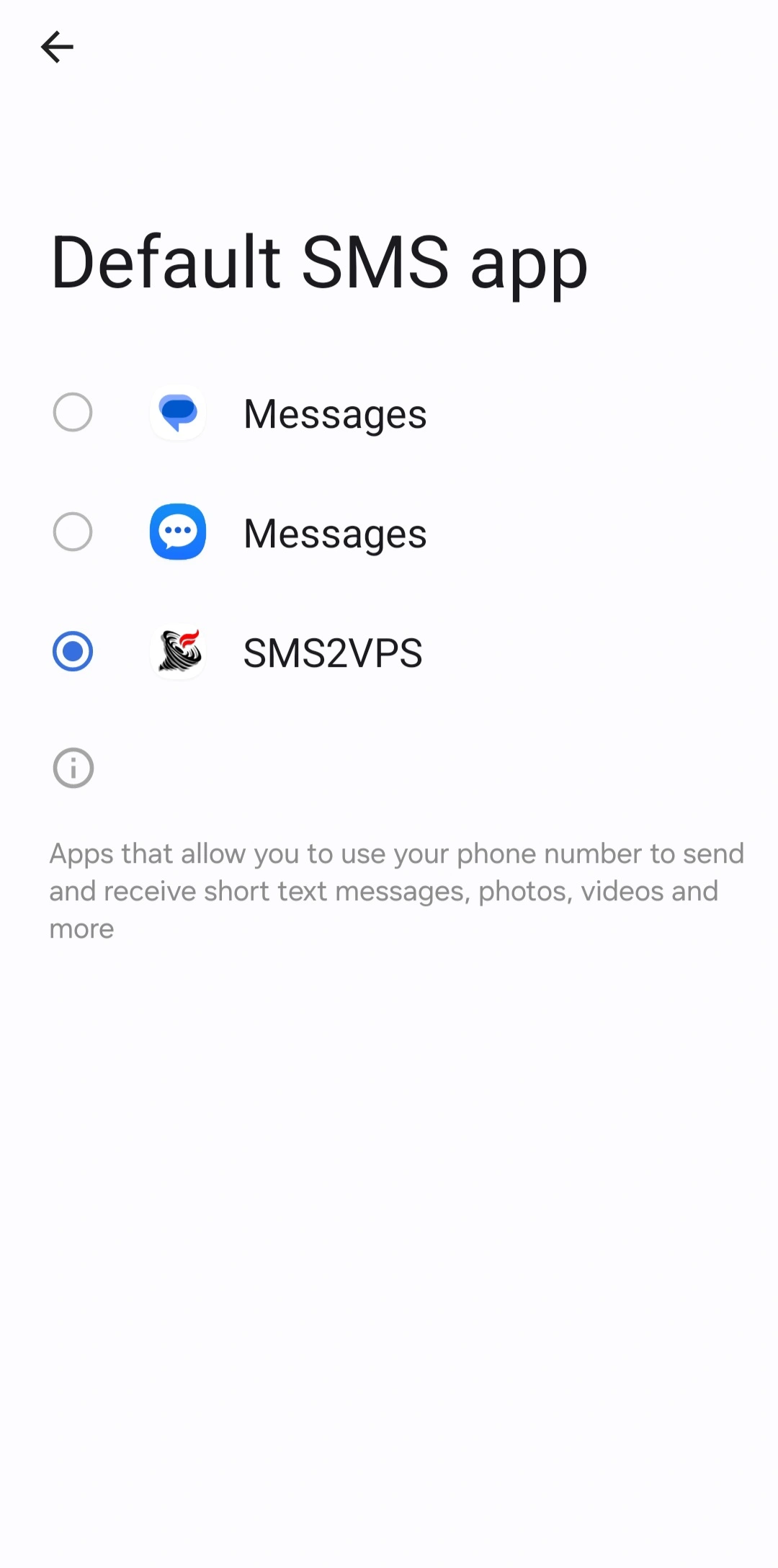
- Set SMS2VPS as your default SMS app (required by Android OS)
- Accept the Terms of Use and Privacy Policy
- Manually configure your VPS connection details (host, port, username, directory) in the VPS Settings tab
- Explicitly activate synchronization by pressing the "Activate SMS Sync" button
You retain full control over which destinations receive your SMS data, when synchronization occurs, and can disable it at any time from the app settings. No data is transferred automatically without your explicit activation.
🔒 SSH-2 Protocol Security
SMS2VPS uses the SSHJ library to establish secure SSH connections to your VPS server. When you activate SMS synchronization, the app utilizes the SSH-2 protocol, which is the modern and secure version of the SSH protocol and the current industry standard for secure remote connections.
This ensures that all communication between your Android device and VPS server is encrypted and protected against unauthorized access, maintaining the privacy and security of your SMS data during transmission.
🌍 Real-World Use Cases for SMS2VPS
Imagine you're traveling abroad and want to leave your Android phone safely at home, perhaps to avoid roaming charges or simply because you don't need it while away. However, you still want to stay connected to important text messages sent to your phone. With SMS2VPS, you can securely synchronize all incoming SMS messages from your device to your private server after setting it up. This ensures you never miss a message, no matter where you are.
Consider monitoring the well-being of elderly parents who live alone. If you're not physically nearby, SMS2VPS allows you to see what messages they receive on their phone in real-time (with their consent and after proper configuration). This offers peace of mind and an opportunity to assist quickly if needed.
But the uses extend much further. Imagine a small business owner who wants to centralize customer communications received via SMS but prefers not to rely on third-party services. By synchronizing messages to their own VPS, the business can automate responses, integrate message data with CRM systems, or trigger alerts for urgent requests with full control over their data privacy.
Or take developers and hobbyists who want to integrate SMS-based controls or notifications in their IoT projects. API integration is still in development, but in future SMS2VPS will also provide a reliable API to capture SMS inputs and route them to custom backend applications for automated processing.
Additionally, journalists or field agents can use the app to securely transmit incoming SMS updates from mobile devices back to a main office without exposing sensitive information over unsecured networks.
Whether it's personal safety, family care, business automation, or technical innovation, SMS2VPS provides a secure, versatile bridge for your Android SMS communication. By synchronizing messages in real-time to a self-hosted environment (after user activation), it empowers users with privacy, control, and instant access to their phone's text messages from anywhere in the world.
🔍 Privacy Notice
The information you provide through our Contact Us form is used solely for the purpose of providing technical support. For complete details on how we protect your information, please read our full Terms of Use & Privacy Policy.
☁️ Google Drive & Gmail Integration
These integrations are optional and disabled by default. You can enable them manually from the Google Settings tab after signing in with Google OAuth.
You can choose to synchronize your SMS messages to Google Drive (as text files) or send them via Gmail (as emails). Our application has been officially verified by Google, ensuring secure and reliable integration with Google services. For the most current information on Google's free usage limits, please refer to: Google Storage Plans and Gmail Sending Limits
How to enable: Simply go to the app settings, sign in with your Google account, select your preferred Google service, and manually activate synchronization. No data is sent to Google services until you explicitly enable this feature.
Important note: When using Google services, be mindful of API limits and quota – this app uses OAuth and approved integrations to remain within Google policies.
If you don't already have a Virtual Private Server (VPS), you can easily and affordably get one through RackNerd or Webdock – These two are trusted providers with datacenters across North America, Europe, and Asia. Enjoy low latency, high performance, and reliable hosting, perfect for running apps like SMS2VPS. To get 15% off for life on all dedicated servers at RackNerd, use the promo code 15OFFDEDI when ordering. The links below are affiliate links.


📱 Why SMS2VPS Must Be Set as the Default Messaging App
To enable the full functionality of SMS2VPS, it must be set as your phone's default messaging app. This is because the Android operating system allows only the default SMS app to access incoming and outgoing text messages securely and directly. For more details, see Google's official guide on changing your default SMS app .
Important note: Changing the default messaging app does not transfer your existing SMS message history to the new app. Your previous messages remain stored in your original messaging app and can be accessed by switching back to it at any time.
When SMS2VPS is set as the default app, it can receive all incoming SMS messages and, after you manually activate synchronization in the settings, safely synchronize them to your chosen destination – such as your VPS server, Google Drive, or Gmail – in real time.
SMS2VPS cannot access, send, or synchronize any messages unless it is the default SMS app and you have enabled synchronization manually. Without this setting, the app cannot function as intended due to Android OS restrictions.
If at any time you wish to return to your original SMS app, you can easily switch back from the system settings. Additionally, if you uninstall SMS2VPS, your phone automatically restores the previous default messaging app.
This means you can safely test SMS2VPS without permanent changes to your device's configuration. While active, the app manages your new text messages in the background (after you activate synchronization), offering enhanced features for secure message backup and synchronization. Note that only messages received after setting SMS2VPS as default will be synchronized – historical messages from your previous app are not automatically included.
❓ Frequently Asked Questions
SMS2VPS ensures security by allowing users to synchronize SMS messages only to user-defined destinations (VPS, Google Drive or Gmail). Synchronization requires explicit user activation.
Yes. You can select VPS, Google Drive, or Gmail as your backup destination.
SMS2VPS is designed to work on Android devices with broad compatibility.
SMS2VPS focuses on user control and data privacy—no third-party server stores your messages.
No. The app is designed to be easy to use even without technical knowledge.